LTL Safety Colour Bomb
This tutorial focuses on MASA’s ltl_safety constraint. Colour Bomb Grid World gives us labelled traces such as bomb and medic; the LTL-safety wrapper advances a DFA over those labels and reports violations when the DFA reaches an accepting unsafe state.
Runnable notebook: notebooks/tutorials/05_ltl_safety_colour_bomb.ipynb
Setup
Use CPU-first setup before importing MASA/JAX modules:
import os

os.environ.setdefault("JAX_PLATFORMS", "cpu")
os.environ.setdefault("TF_CPP_MIN_LOG_LEVEL", "2")
Import the environment labels, DFA helpers, and the MASA factory:
from masa.common.ltl import Atom, DFA
from masa.common.utils import make_env
from masa.envs.tabular.colour_bomb_grid_world import label_fn
from masa.examples.colour_bomb_grid_world.property_2 import make_dfa as make_diffusion_dfa
from masa.examples.colour_bomb_grid_world.property_3 import make_dfa as make_medic_recovery_dfa
Define and Load DFA Properties
A safety DFA uses accepting states as unsafe states. The inline property below means “never observe bomb”:
def make_never_bomb_dfa():
    dfa = DFA([0, 1], 0, [1])
    dfa.add_edge(0, 1, Atom("bomb"))
    return dfa
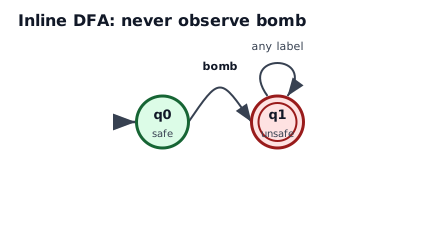
Observing bomb moves from safe state q0 to accepting unsafe state q1.
The loaded property_2 DFA is more nuanced: after entering a bomb cell, the agent must stay on bomb for one extra step before leaving.
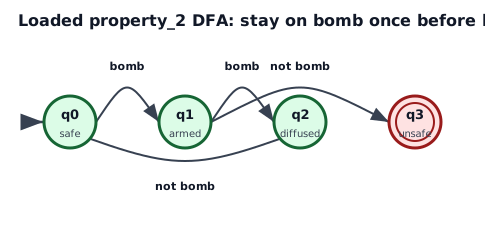
Leaving bomb immediately reaches accepting unsafe state q3; staying on bomb once reaches q2 and can return to safe state q0.
Build an LTL-Safety Environment
Use obs_type="dict" when teaching or debugging, because it exposes both parts of the product observation:
env = make_env(
    "colour_bomb_grid_world",
    "ltl_safety",
    30,
    label_fn=label_fn,
    dfa=make_never_bomb_dfa(),
    obs_type="dict",
)
The returned observation has obs["orig"] for the base grid state and obs["automaton"] for the DFA state index. The same automaton state is also reported in info["automaton_state"].
Inline DFA: Never Hit a Bomb
With seed 1, actions [1, 1, 1, 1] move right from the start and reach bomb state 78.
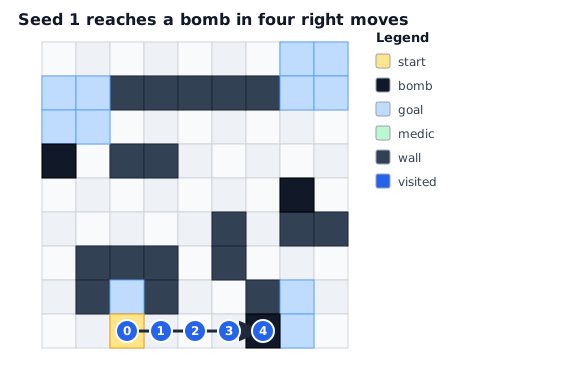
The final visited state is labelled bomb.
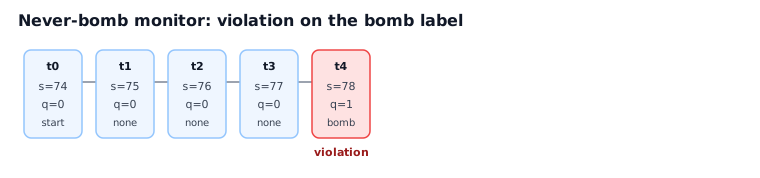
On the bomb label, automaton_state becomes 1, violation becomes 1.0, cum_unsafe becomes 1.0, and satisfied becomes 0.0.
Loaded DFA: Bomb Diffusion
The same environment trace can mean something different under a different DFA. Under property_2, touching bomb is allowed, but leaving immediately is unsafe.
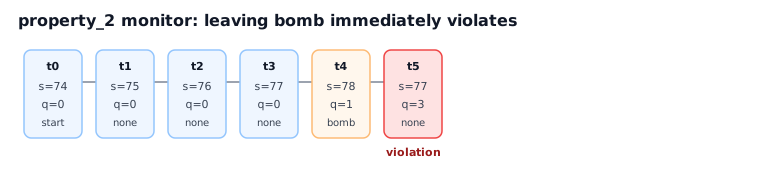
Actions [1, 1, 1, 1, 0] hit bomb and then leave, so the DFA reaches accepting unsafe state q3.
If the agent stays on bomb for one extra step, the same property remains satisfied:
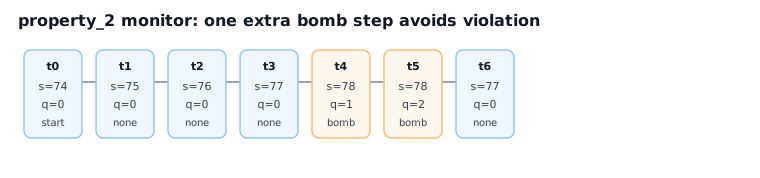
Actions [1, 1, 1, 1, 4, 0] hit bomb, stay once, then leave with cum_unsafe=0.0 and satisfied=1.0.
V2 Extension: Medic Recovery
colour_bomb_grid_world_v2 adds medic labels and the larger loaded property_3 DFA. After observing bomb, the monitor expects recovery by reaching and remaining on medic; if recovery does not happen in time, the DFA reaches accepting violation state 21.
With seed 14, actions [2, 2, 2, 2] + [4] * 11 start at state 16, reach a bomb, and wait without reaching a medic.
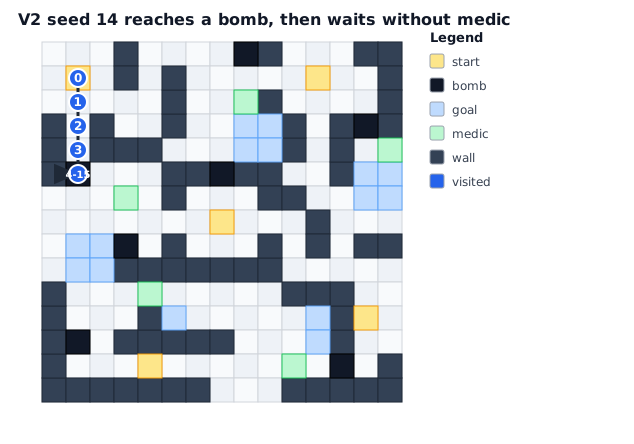
The V2 trace reaches a bomb and then repeatedly stays there.

The automaton counts through the recovery obligation and reaches accepting state 21, so later steps report violation.
What to Look For
ltl_safetytreats labels as a sequence, not just isolated step costs.obs_type="dict"makes the product state visible asobs["orig"]plusobs["automaton"].info["automaton_state"]mirrors the monitor state.info["constraint"]["step"]reports immediatecostandviolation.info["constraint"]["episode"]reportscum_unsafeandsatisfied.